


7 Travel Hacks Right on Your Cell Phone
If you have a smart phone and a passport in 2025, it is easier for you to travel anywhere in the world than it ever has been for any person in any generation before you.
Here are seven things your phone can do for you to help you travel further and save more.
1. eSIM Capabilities
Almost all Android phones on the market, as well as all iPhones model 11 and newer are equipped to support eSIM. What does this mean? The eSIM in your phone is what connects your phone to cell towers and data. In the past, to switch to another country’s SIM card to use their cell phone network, I would physically open the SIM port of my phone, buy a new SIM card from my destination country, and install it myself (in EVERY country I visited!).
NO MORE OF THAT.
With eSIM, I simply download the Airalo app, pay for an eSIM card before or during my trip, and turn it on in my settings when I get there. If you’ve never traveled internationally with a SIM card, this is going to revolutionize travel for you! You’re going to be able to socialize, research, navigate—just like you’re at home!
This is not only SO much easier than buying and installing physical SIM cards, but it’s cheaper, too! I paid $3 for a full week of cell phone data in Costa Rica last year!
Use my link to download Airalo and use code KIMBER8825 get a $3 credit towards your first eSIM card. They will walk you through how to buy and install the eSIM directly in the app—again, it’s so easy! 🙂

2. Offline Google Maps
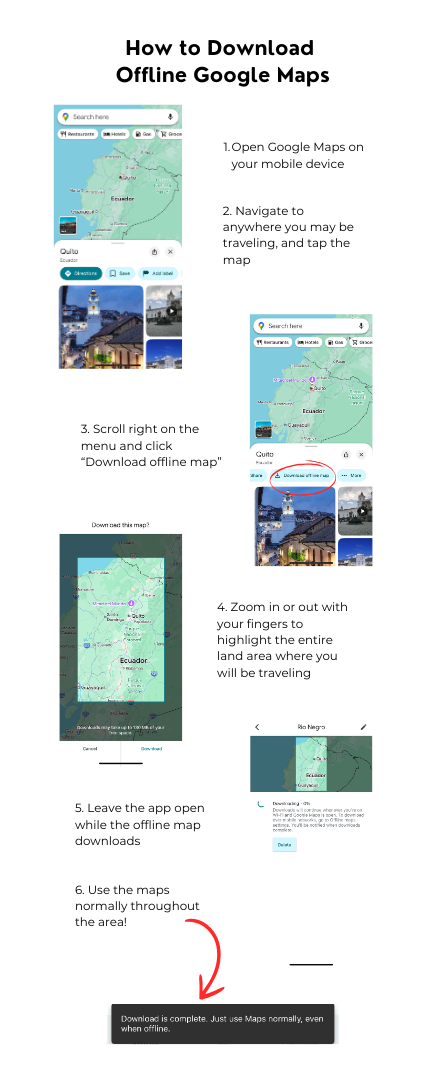
If an eSIM (trick #1) is not an option, OR if you’re traveling somewhere where the cell reception may be spotty, download an offline-version of the area on Google Maps and you’ll never get lost again! Since Google Maps also supports public transportation, you can even get step-by-step directions for trains, metros, busses, and whatever is available in the area.
(And this is also a great trick domestically for areas with little cell service like mountains and national parks!)
Here’s how to do it from your cell phone:
3. Currency Calculator
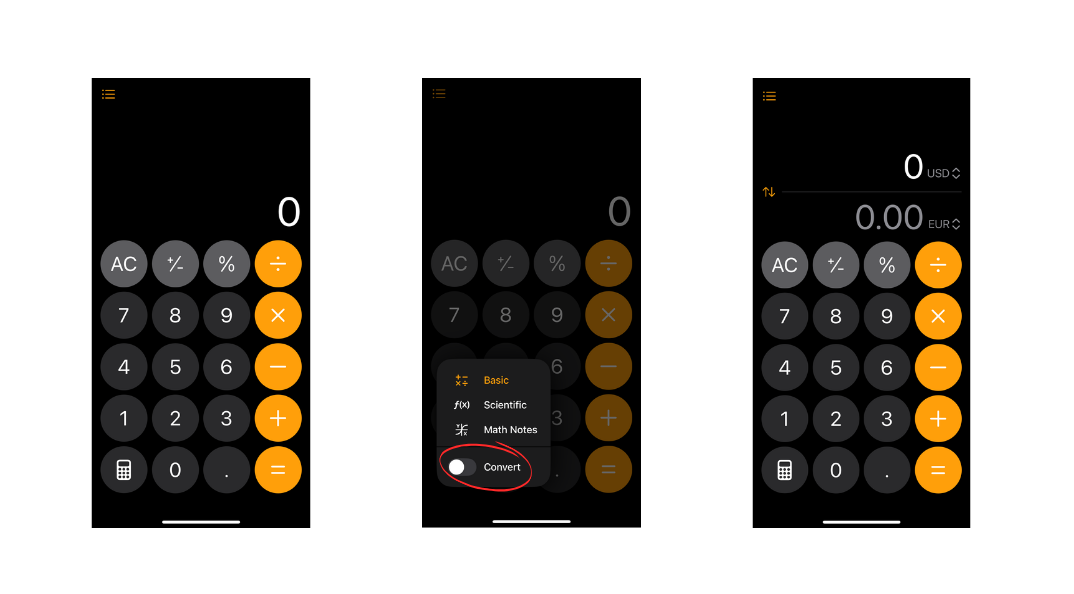
Did you know you can use your iPhone calculator to convert currency? Just open the calculator app, turn on the “Convert” button, and start converting!
4. Translation Camera
With the Google Translate app, you can translate written language immediately just by pointing your phone camera!
This is a free app, and you can also use it offline (not connected to wifi or cell tower) if you download the language you will be translating ahead of time.
In addition to the Translate Camera working by translating anything you point your camera at, you can also translate speech and text. This is a must-have app while traveling in any country where you aren’t 100% fluent!


5. Travel Insurance
I highly recommend buying travel insurance before going abroad. This is going to protect you not only in the event of travel interruptions and emergency situations, but also will act as health insurance in the event that you need health care outside of your home country.
My go-to for travel insurance is Safety Wing. It’s the absolute best that I have used, and recommend to all of my friends and family.
6. Flight Deal Notifications
Those who know me and travel with me know: I LOVE finding a good flight deal.
But for 2+ years I have been relying on Going to track the flight deals for me and send me alerts. They have a really great app where you can specify up to 10 departure airports to watch flight deals from, set a wish list of destinations for flight deals and more!
Note that this is not really a search tool; it only shows flights that are on a good sale. That said, this is a huge reason I’ve been able to travel to all six continents in the past ten years! I rely on Going to tell me where the flight deals are, and I travel to those places! I pay for the Premium subscription at $49/year, and it has saved me thousands!
Subscribe to Going flight deal alerts through my link and get 20% off any paid subscription!
7. Track Your Travels
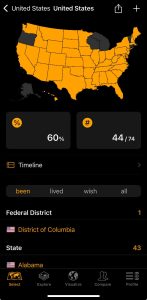
And for a fun one: download the app ‘Been’ to highlight all of the countries, continents, regions/states, and airports where you have been! This is such a fun way to keep track, and is right on your phone so you don’t have to count passport stamps. 🙂
Happy Travels!